Python MySQL – Create Database
Python Database API ( Application Program Interface ) is the Database interface for the standard Python. This standard is adhered to by most Python Database interfaces. There are various Database servers supported by Python Database such as MySQL, GadFly, mSQL, PostgreSQL, Microsoft SQL Server 2000, Informix, Interbase, Oracle, Sybase etc. To connect with MySQL database server from Python, we need to import the mysql.connector interface.
Syntax:
CREATE DATABASE DATABASE_NAME
Example:
import mysql.connector
dataBase = mysql.connector.connect(
host ="localhost",
user ="user",
passwd ="gfg"
)
cursorObject = dataBase.cursor()
cursorObject.execute("CREATE DATABASE geeks4geeks")
|
Output:
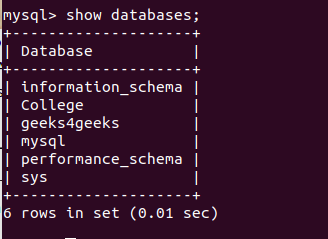
The above program illustrates the creation of MySQL database geeks4geeks in which host-name is localhost, the username is user and password is gfg.
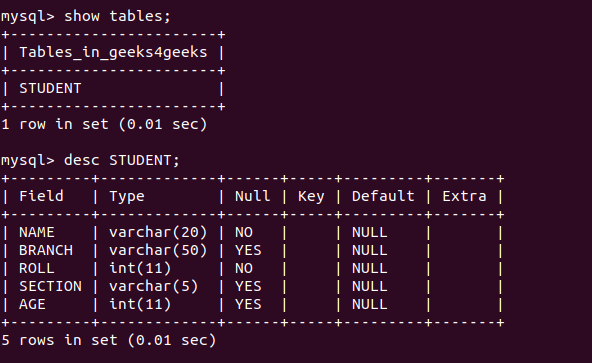
Let’s suppose we want to create a table in the database, then we need to connect to a database. Below is a program to create a table in the geeks4geeks database which was created in the above program.
import mysql.connector
dataBase = mysql.connector.connect(
host = "localhost",
user = "user",
passwd = "gfg",
database = "geeks4geeks" )
cursorObject = dataBase.cursor()
studentRecord =
cursorObject.execute(studentRecord)
dataBase.close()
|
Output:
Sent data from client to server (ESP8266 as client)
ESP8266 IoT Client
/**
PostHTTPClient.ino
Created on: 21.11.2016
*/
#include <ESP8266WiFi.h>
#include <ESP8266HTTPClient.h>
/* this can be run with an emulated server on host:
cd esp8266-core-root-dir
cd tests/host
make ../../libraries/ESP8266WebServer/examples/PostServer/PostServer
bin/PostServer/PostServer
then put your PC's IP address in SERVER_IP below, port 9080 (instead of default 80):
*/
//#define SERVER_IP "10.0.1.7:9080" // PC address with emulation on host
#define SERVER_IP "192.168.77.102:5000"
#ifndef STASSID
#define STASSID "Yasin Arafat"
#define STAPSK "yasinarafat931300"
#endif
void setup() {
pinMode(A0, INPUT);
Serial.begin(115200);
Serial.println();
Serial.println();
Serial.println();
WiFi.begin(STASSID, STAPSK);
while (WiFi.status() != WL_CONNECTED) {
delay(500);
Serial.print(".");
}
Serial.println("");
Serial.print("Connected! IP address: ");
Serial.println(WiFi.localIP());
}
void loop() {
// wait for WiFi connection
if ((WiFi.status() == WL_CONNECTED)) {
WiFiClient client;
HTTPClient http;
Serial.print("[HTTP] begin...\n");
// configure traged server and url
http.begin(client, "http://" SERVER_IP "/client"); //HTTP
http.addHeader("Content-Type", "application/text");
Serial.print("[HTTP] POST...\n");
// start connection and send HTTP header and body
int input = analogRead(A0);
char data[10];
sprintf(data, "%d", input);
int httpCode = http.POST(data);
// httpCode will be negative on error
if (httpCode > 0) {
// HTTP header has been send and Server response header has been handled
Serial.printf("[HTTP] POST... code: %d\n", httpCode);
// file found at server
if (httpCode == HTTP_CODE_OK) {
const String& payload = http.getString();
Serial.println("received payload:\n<<");
Serial.println(payload);
Serial.println(">>");
}
} else {
Serial.printf("[HTTP] POST... failed, error: %s\n", http.errorToString(httpCode).c_str());
}
http.end();
}
delay(1000);
}
FLASK SERVER
from flask import Flask, request, render_template
app = Flask(__name__)
result = b'null'
@app.route("/client", methods = ['GET','POST'])
def client():
global result
result = request.data
return result
@app.route("/")
def index():
global result
return render_template("index.html", data = result.decode("utf-8"))
if __name__ == '__main__':
app.run(host='0.0.0.0', port=5000)
index.html
<html>
<body>
{{data}}
</body>
</html>
Comments
Post a Comment